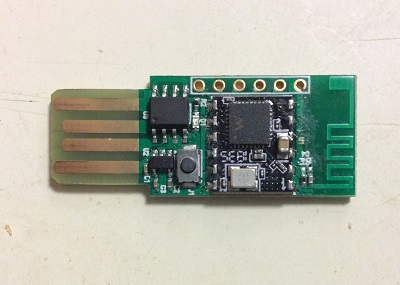
I recently obtained some Adafruit Feather nRF52 Bluefruit LE (paid link) boards.
The main chip on this board is the nRF52832 from Nordic, which offers Bluetooth Low Energy (BLE) communication, but does not have WiFi.
Adafruit made a nice Arduino core for nRF52, so that it can be programmed easily with the familiar Arduino environment.
Incidentally, this isn't the first BLE device I have.
Many small battery-powered devices, including the Fitbit Alta HR tracker (paid link) I wear daily, uses BLE for communication.
This means, I could use the nRF52 board to answer one question: is Junxiao in the room?
#include <bluefruit.h>
const uint8_t FITBIT_UUID[] = {
0xBA, 0x56, 0x89, 0xA6, 0xFA, 0xBF, 0xA2, 0xBD,
0x01, 0x46, 0x7D, 0x6E, 0x00, 0xFB, 0xAB, 0xAD,
};
unsigned long lastReport = -1;
void setup()
{
Serial.begin(115200);
Bluefruit.begin(0, 0);
Bluefruit.setTxPower(-40);
Bluefruit.autoConnLed(false);
Bluefruit.Scanner.setRxCallback(scan_callback);
Bluefruit.Scanner.useActiveScan(false);
Bluefruit.Scanner.filterUuid(BLEUuid(FITBIT_UUID));
Bluefruit.Scanner.start(0);
}
void scan_callback(ble_gap_evt_adv_report_t* report)
{
unsigned long now = millis();
Serial.printf("%09d ", now);
Serial.printBufferReverse(report->peer_addr.addr, 6, ':');
Serial.printf(" %d\n", report->rssi);
Bluefruit.Scanner.resume();
lastReport = now;
}
void loop()
{
digitalWrite(LED_BUILTIN, millis() < lastReport + 5000);
delay(100);
}
This sketch initializes a BLE scanner.
filterUuid asks the scanner to invoke scan_callback function whenever it receives an advertisement from a Fitbit Alta HR, identified by the service UUID ADABFB00-6E7D-4601-BDA2-BFFAA68956BA (readable by Bluefruit app for iPad).
useActiveScan(false) configures the scanner to passively listen for periodical advertisement packets without transmitting "scan request" packets, to conserve battery on my wristband.
When a "report" (scan_callback invocation) is received, the red LED is lit for five seconds.
In practive, it works OK.
When I'm within 10 meters from the Bluefruit board, the LED lights up frequently, but it's not consecutive because the Fitbit does not advertise itself very often.
If I put my Fitbit into the microwave (paid link) acting as a Faraday cage, the onboard LED no longer lights up.
Oops, I got to run before my Fitbit gets fried in the microwave!